
Table of Contents
- Why Custom AI Solutions Matter for Small Business
- Custom AI Solutions Comparison
- 1. Uberwood Agency: Fully Managed Custom AI Systems
- 2. Google Cloud AI & Agents: Scalable No-Code Automation
- 3. Microsoft Azure AI: Enterprise-Grade Flexibility
- 4. IBM watsonx Assistant: Conversational AI for Customer Service
- 5. Salesforce Einstein: AI-Powered CRM Integration
- 6. UiPath: Robotic Process Automation with AI
Last Updated: August 15, 2026
Why Custom AI Solutions Matter for Small Business
Small business owners face constant pressure: handle more volume with the same team or hire additional staff and watch margins shrink. Custom AI solutions address this directly by automating repetitive work, qualifying leads, and managing customer interactions without requiring new headcount. The difference between off-the-shelf tools and custom systems is precision, generic platforms solve generic problems, while tailored AI systems solve your specific problems.

At Uberwood Agency, we've worked with home service companies, e-commerce brands, and professional service firms that all faced the same bottleneck: their existing systems couldn't handle workflow volume or complexity. A plumbing company receiving 20 calls daily during peak season can't afford to miss leads. An e-commerce store can't manually nurture every abandoned cart. A consulting firm can't have staff spending hours on invoice processing.
The real value of custom AI isn't just automation, it's operational efficiency, data-driven decision making, and competitive advantage. When you automate repetitive work, your team focuses on closing deals, serving customers, and growing revenue.
Custom AI Solutions Comparison
Choosing between custom AI solutions requires understanding the tradeoff between flexibility and implementation effort. Pre-built platforms like HubSpot or Tidio get you running in days but cap out at standard features. Custom development takes longer upfront but delivers exactly what your business needs.
| Solution Type | Implementation Time | Customization | Ongoing Support | Best For |
|---|---|---|---|---|
| Fully Managed Custom AI | 2-6 weeks | Complete | Included | Businesses wanting hands-off operation |
| Platform-Based (Low-Code) | 1-2 weeks | Limited | Self-service | Teams comfortable managing their own systems |
| Open-Source + Internal Dev | 4-12 weeks | Unlimited | Internal team | Orgs with strong technical resources |
| Hybrid (Platform + Custom) | 2-4 weeks | Moderate | Mixed | Businesses needing both speed and customization |
The decision hinges on three factors: your budget for implementation, your team's technical capacity, and how specific your automation needs are. If your workflow is standard, lead capture, email follow-up, basic CRM integration, a platform approach works fine. If your process is unique or involves multiple systems, custom development pays for itself quickly.
1. Uberwood Agency: Fully Managed Custom AI Systems
Uberwood Agency specializes in designing, engineering, and operating custom AI systems that handle the entire workflow from lead intake through customer service and operations. Unlike platforms where you configure templates, Uberwood builds systems tailored to your exact business process.
The core strength is the end-to-end model. Voice agents answer calls and route them correctly. Automations process data and update your CRM. Chatbots qualify leads on your website. All integrates with your existing systems, Salesforce, HubSpot, Zapier, whatever you're already using. You don't manage the AI; Uberwood does.
For home service companies, this eliminates the call-routing nightmare. A plumbing company can set up voice agents that understand service areas, schedule types, and emergency vs. routine calls. The agent captures job details, checks availability, and either books the appointment or routes to a dispatcher. No dropped calls. No confusion.
The tradeoff is upfront implementation time and outsourcing the technical layer entirely. If your team wants to own the AI stack and tinker with it, this isn't the fit.
2. Google Cloud AI & Agents: Scalable No-Code Automation
Google Cloud AI & Agents delivers pre-built machine learning models and no-code workflow automation for businesses wanting to build their own systems without coding expertise. The platform includes speech recognition, image analysis, natural language processing, and integration with Google Workspace.
No-code AI agents let you define workflows: "If customer asks about shipping, respond with X. If they ask about returns, escalate to support." The system learns from interactions and improves over time. You get predictive analytics on top, forecasting demand and scoring leads automatically.
For small businesses already in the Google ecosystem, this is efficient. Implementation is faster than custom development, and Google's infrastructure scales automatically.
The limitation is that you're constrained by what Google's pre-built models can do. Custom integrations with legacy systems can require technical help, which adds cost.
3. Microsoft Azure AI: Enterprise-Grade Flexibility
Microsoft Azure AI provides cognitive services (vision, speech, language) plus Azure Machine Learning for building custom models. If you need both pre-built AI and the ability to train custom models on your own data, Azure offers the most flexibility.
The platform integrates deeply with Microsoft products, Outlook, Teams, Dynamics 365 CRM, so if your business runs on the Microsoft stack, integration is native. You can build conversational AI bots, automate document processing, or create predictive models specific to your business.
Azure's strength is scalability and breadth of AI services. You're not limited to templates. The cost model is pay-as-you-go with a free tier for testing.
The friction point is complexity. Azure requires more technical setup than no-code platforms. You'll likely need a developer or consultant to configure it properly.
4. IBM watsonx Assistant: Conversational AI for Customer Service
IBM watsonx Assistant is purpose-built for conversational AI, chatbots and virtual assistants that handle customer interactions at scale. The natural language processing is strong, so the assistant understands intent even when customers phrase questions differently.
The platform works across channels: website chat, SMS, social media, voice. You can train it on your FAQs and documentation. It escalates to humans when needed, and you can review conversations to improve accuracy.
For businesses handling repetitive customer service questions, this is effective. A support team handling 200 daily inquiries can offload 60-70% of routine questions to the bot.
The downside is that watsonx is primarily for customer-facing conversations. If you need automation across business operations, invoice processing, or lead routing, you'll need additional tools. It's also enterprise-focused, which means higher pricing.
5. Salesforce Einstein: AI-Powered CRM Integration
Salesforce Einstein embeds AI directly into the CRM platform. Lead scoring prioritizes prospects most likely to convert. Opportunity scoring identifies deals at risk. Conversation intelligence analyzes calls and emails to surface insights.
The advantage is integration, Einstein works within Salesforce, so your sales team sees AI recommendations directly in their workflow. No context switching.
The catch is that Einstein requires a Salesforce CRM subscription, starting at $75 per user per month. For a team of five, that's $375 monthly before Einstein features. Advanced features require higher-tier Salesforce plans.
This is best for businesses already committed to Salesforce.
6. UiPath: Robotic Process Automation with AI
UiPath specializes in Robotic Process Automation (RPA), automating repetitive, rule-based tasks across your business systems. A bot can log into your accounting software, pull invoices, extract data, and update your CRM. Another bot can monitor email, sort leads by criteria, and assign them to salespeople.
UiPath adds AI capabilities on top, so bots can handle exceptions and learn from patterns. Process mining tools help identify which workflows benefit most from automation.
Businesses using RPA report significant time savings, often 20+ hours per week per bot. The cost-per-bot is lower than hiring staff.
The limitation is that RPA works best for well-defined, repetitive processes. If your workflow changes frequently or requires judgment calls, RPA struggles.
7. HubSpot Chatbot Builder & Tidio: Affordable Entry Points
For businesses on a budget, HubSpot's free Chatbot Builder and Tidio offer low-cost ways to deploy customer-facing AI. HubSpot's tool is free (included with their free CRM) and requires no coding. Tidio combines live chat with AI chatbots, starting at $29 per month.
These tools won't replace custom AI or enterprise platforms, but they're effective for small teams handling moderate volume. For a solo founder or two-person team, they're enough to capture and qualify leads.
The tradeoff is flexibility. You're limited to what the platform offers.
Which Solution Is Right for Your Business?
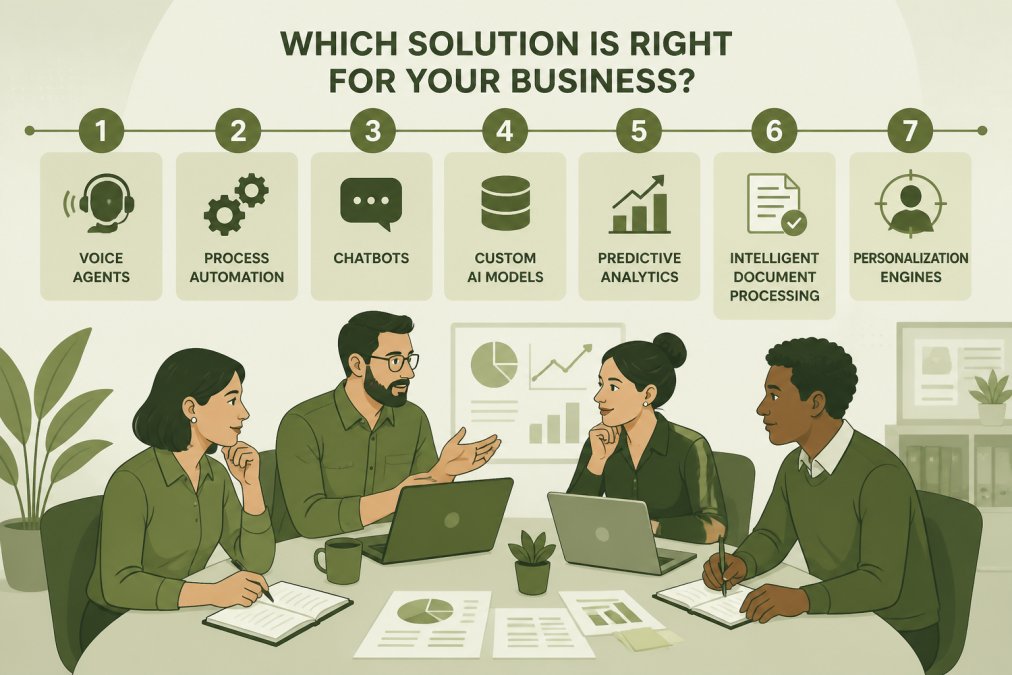
The right choice depends on three variables: your volume, your technical capacity, and your budget.
High volume + low technical capacity + budget available: Uberwood Agency or a fully managed service. You need systems that work reliably without your team managing them.
High volume + some technical capacity + moderate budget: Google Cloud AI or Microsoft Azure. You can configure and manage the platform yourself with more customization than off-the-shelf tools.
Moderate volume + limited budget + simple workflows: HubSpot Chatbot Builder or Tidio. These get you running quickly and cheaply.
Highly specialized workflows + budget available: Custom development or UiPath. Off-the-shelf platforms won't fit your exact process.
Pricing for a fully managed solution from an agency, or for platform-based solutions, depends on the specific services, complexity, and volume required. You can typically find more detailed pricing information by contacting providers directly.
Implementation Roadmap: Getting Started
Start with clarity on what you're actually trying to solve. "We're losing 10 leads per week because our phone system doesn't capture information" is specific. "Our support team spends 15 hours weekly answering the same questions" is actionable.
Map your current workflow. Where does information enter your system? How does it flow? Where do people spend time on repetitive tasks? Which steps create bottlenecks?
Pilot before full deployment. If you're considering a platform, run it for two weeks on a subset of your workflow. If you're considering custom development, start with one specific use case, lead intake or customer service, not your entire operation.
Measure the baseline before you implement anything. How many leads are you capturing now? How long does lead follow-up take? What's your response time to customer inquiries? These numbers become your before-and-after comparison.
Data Privacy and Security Compliance
Any AI system touching customer data must comply with relevant regulations. The main considerations are data residency, encryption, and access controls.
For most small businesses, the practical requirement is that your AI vendor complies with standard security practices: data encrypted in transit and at rest, regular security audits, and clear data retention policies. If you're in healthcare, finance, or handle sensitive personal data, verify compliance with specific regulations.
Uberwood Agency handles data security as part of their fully managed model. Platforms like Google Cloud and Azure include security features, but you're responsible for configuring them correctly.
The key question: who owns the data, and who can access it? Make sure your contract is clear before implementation.
ROI Calculation Framework
Measure AI impact using this framework:
Time Saved: How many hours per week does the AI system save? Multiply by your average hourly cost. Example: 15 hours saved × $50/hour = $750 per week.
Revenue Captured: How many additional leads or sales does the system enable? Multiply by average deal value and close rate. Example: 5 additional leads per week × $2,000 average deal × 20% close rate = $2,000 per week.
Cost Reduction: Does the system reduce operational costs? Example: 10 hours of data entry eliminated × $30/hour = $300 per week.
Total Monthly Impact: ($750 + $2,000 + $300) × 4.3 weeks = $12,795 per month.
Net Benefit: Subtract the monthly cost of the AI system. If it's $3,000 per month, your net benefit is $9,795 per month, or $117,540 annually.
The key is measuring before and after, not guessing.
Custom AI solutions for small business are no longer optional, they're a competitive necessity. The businesses capturing market share are those automating the right processes and freeing their teams to focus on growth. Whether you choose a fully managed service like Uberwood Agency, a platform like Google Cloud or Azure, or an in-house solution depends on your specific constraints. Start with clarity on what problem you're solving, measure your baseline, and pilot before full deployment. Get A Free Estimate Quote And Book A Call Today with Uberwood Agency to discuss your specific workflow and explore how custom AI can simplify your operations without the complexity of managing it yourself.
Frequently Asked Questions
What is the best AI to use for a small business?
The best AI for your small business depends on your specific needs. If you want fully managed custom AI systems without technical overhead, Uberwood Agency handles everything end-to-end. For chatbots, HubSpot offers a free option if you use their CRM. Google Cloud and Microsoft Azure provide scalable, flexible platforms suited to businesses growing their AI capabilities. Evaluate based on your existing tools, budget, and whether you need done-for-you service or prefer to build in-house.
How much does it cost to develop a custom AI solution for a small business?
Custom AI development costs vary significantly based on complexity and scope. Project-based consulting typically ranges from $5,000 to $15,000 for defined automation projects. Monthly retainers for ongoing management can run $2,000 to $8,000 monthly. Off-the-shelf platforms like HubSpot start free, while Tidio begins at $29 per month. For accurate pricing tailored to your business, contact providers directly for a quote based on your specific requirements.
What are the most common use cases for custom AI in small business operations?
Small businesses deploy custom AI most often for automating repetitive tasks, handling customer service inquiries through chatbots and voice agents, processing invoices and data entry, qualifying and routing sales leads, and scheduling appointments. AI also powers predictive analytics to identify high-value opportunities and automates email sequences for customer nurturing. These applications free up staff time and improve response speed, directly impacting customer experience and operational efficiency.
How can I incorporate AI into my small business without hiring a technical team?
Fully managed services like Uberwood Agency handle the technical engineering for you, allowing business owners to focus on operations and sales. Alternatively, no-code platforms like HubSpot's Chatbot Builder, Tidio, and ManyChat let non-technical users build automation through drag-and-drop interfaces. Google Cloud and Microsoft Azure offer pre-built AI services requiring minimal coding. The key is choosing a solution that matches your technical comfort level and provides support or done-for-you implementation.
What is the difference between off-the-shelf AI and custom AI solutions?
Off-the-shelf AI platforms (like HubSpot, Tidio, or Google Cloud) offer pre-built features designed for general use cases and work quickly with minimal setup. Custom AI solutions are engineered specifically for your business processes, systems, and workflows, providing deeper integration and tailored automation. Off-the-shelf is faster and cheaper upfront but may require workarounds for unique needs. Custom solutions cost more initially but deliver precision, scalability, and competitive advantage through systems built exactly for your operations.