
Table of Contents
- What AI Integration for CRM Workflows Actually Does
- Step 1: Audit Your Current CRM and Tech Stack
- Step 2: Map Your High-Friction Workflows to Automate
- AI CRM Automation Best Practices for Your Team
- AI-Driven Lead Scoring Examples and Implementation
- Top AI-Powered CRM Tools 2026 and Integration Paths
- CRM Workflow Automation Scripts and Triggers You Need
- Common Integration Mistakes and How to Avoid Them
Last Updated: August 12, 2026
What AI Integration for CRM Workflows Actually Does
AI integration for CRM workflows automates repetitive, data-heavy tasks that consume your sales team's time without moving deals forward. Instead of manually logging calls, scoring leads, or sending follow-ups, your CRM learns patterns from your business and handles these tasks automatically.
At Uberwood Agency, we've worked with home service companies, e-commerce stores, and growing SMBs drowning in lead volume but lacking technical bandwidth to implement AI themselves. The common pattern: they had the right tools (HubSpot, Salesforce, custom databases), but those tools weren't talking to each other. AI integration bridges that gap.
Here's what actually changes when you implement AI in your CRM:
- Automated lead routing sends incoming leads to the right team member based on service area, skill, or capacity
- Real-time lead scoring ranks prospects by likelihood to convert
- Predictive analytics flag customers at risk of churn or ready to upsell
- Workflow automation triggers follow-ups, status updates, and data entry without human intervention
- Natural language processing extracts intent from customer emails and calls, populating CRM fields automatically
The result is operational efficiency, fewer dropped leads, faster response times, and current data instead of weeks behind.
Step 1: Audit Your Current CRM and Tech Stack
Before adding AI to your CRM workflows, document what you're working with: your CRM platform (HubSpot, Salesforce, Pipedrive, or custom database), automation tools, phone system, email platform, and other daily systems. Write down which data lives where and how it flows between systems.

Next, identify manual workflows. Time tasks that happen repeatedly: logging call notes, updating lead status, sending follow-up emails, categorizing leads. If a task takes more than five minutes and happens more than once daily, it's a candidate for automation.
Ask your team directly: what takes the most time? A plumbing company might find that routing calls by service area is their bottleneck. An e-commerce store might discover that manual abandoned-cart follow-ups consume two hours daily.
Document your current data quality too. Are phone numbers consistently formatted? Do all leads have a source field? AI works best with clean, structured data. Messy data means your AI learns from bad inputs and produces bad results.
Step 2: Map Your High-Friction Workflows to Automate
Focus on tasks that happen daily or multiple times daily and directly affect lead capture, conversion, or customer retention.
For home service businesses, high-friction workflows typically include incoming call routing based on service area and technician availability, lead qualification, appointment scheduling, and job completion follow-ups.
For e-commerce, common targets are abandoned cart recovery sequences, post-purchase upsell triggers, customer segment identification, and review collection.
For professional services, priorities shift to lead qualification and intake, proposal generation and follow-up, client onboarding, and renewal opportunity identification.
Map each workflow: what triggers it, what data it needs, what the output should be, and what happens next. This mapping clarifies whether AI is the right tool or whether a simpler automation would work.
AI CRM Automation Best Practices for Your Team
Set clear automation rules. Define exactly when your AI should act. "Send a follow-up email to leads marked as 'interested' who haven't responded in 48 hours, but only between 9 AM and 5 PM on business days" is actionable.
Monitor output for the first 30 days. Review a sample of automated decisions daily. Is the lead scoring accurate? Are follow-up emails hitting the right people? Adjust your rules based on what you see.
Maintain data hygiene. AI is only as good as the data it learns from. Assign someone to clean your data before launch and maintain it weekly.
Train your team on what changed. Your sales team needs to understand which actions trigger automation, what the automation does, and how to override it if needed. A 30-minute training session prevents confusion and resistance.
Start small and scale. Automate one workflow first. Get comfortable with it. Then add the next workflow. This approach builds confidence and catches problems early.
AI-Driven Lead Scoring Examples and Implementation
Lead scoring is one of the highest-impact uses of AI in CRM workflows. Instead of treating all leads equally, your system ranks them by likelihood to convert, so your team works on the most promising deals first.
Traditional lead scoring uses static rules: a lead gets points for visiting your pricing page, points for downloading a guide. AI-driven lead scoring learns from your actual conversion data. It identifies patterns in leads who converted versus those who didn't. Maybe leads from certain industries convert faster. Maybe the combination of "downloaded guide + visited pricing page + opened follow-up email" is your strongest signal.
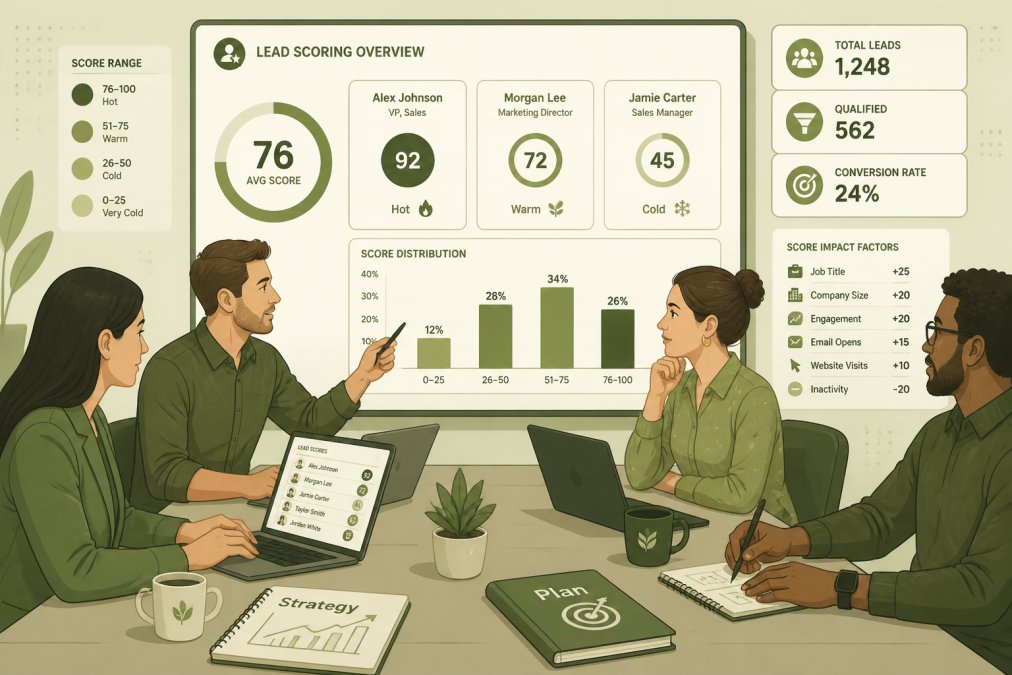
Here's how to implement it:
Step 1: Gather historical data. Export your last 6-12 months of leads with their outcomes (converted, lost, still in pipeline). Include all data your CRM has: source, industry, company size, pages visited, emails opened, calls made, proposal sent, deal size.
Step 2: Define "conversion." What does winning look like for your business? A closed deal? A scheduled consultation? Be specific.
Step 3: Train your model. Feed this data to your AI system. The AI identifies which factors most strongly predict conversion for YOUR business specifically.
Step 4: Apply scores to new leads. As new leads enter your CRM, the system scores them automatically. A lead matching your best customers' profile gets a high score.
Step 5: Act on the scores. Your team works leads in score order. High-scoring leads get immediate follow-up. Low-scoring leads get lighter touch or deprioritization.
The key difference from traditional scoring: the AI continuously learns. As you close more deals, it refines its understanding of what a good lead looks like for your specific business.
Top AI-Powered CRM Tools 2026 and Integration Paths
Your choice depends on your current system, budget, and whether you want a built-in solution or a third-party integration.
Native AI in major CRM platforms:
HubSpot's AI features are built directly into the platform: lead scoring, email content suggestions, meeting summaries, and predictive churn analysis. If you're starting fresh or already using HubSpot, this is the path of least resistance.
Salesforce Einstein provides similar native AI: lead scoring, opportunity insights, and workflow recommendations. Salesforce is more enterprise-focused and expensive, but if you're already deep in the Salesforce ecosystem, Einstein makes sense.
Third-party AI integrations:
If you're using a smaller CRM platform (Pipedrive, Zoho, custom database) or want more control over your AI approach, third-party integrations are your path. Tools like Zapier let you connect your CRM to specialized AI services.
Uberwood Agency builds custom AI integrations for businesses needing more than off-the-shelf solutions. We design systems that connect your CRM to AI voice agents, chatbots, and automation workflows, all under one roof, fully managed.
The integration decision matrix:
| Scenario | Best Approach | Why |
|---|---|---|
| Starting fresh, under 50 users | HubSpot native AI | Simple, integrated, affordable |
| Already using HubSpot, want advanced AI | HubSpot + third-party tools | Keep your current system, add specialized AI |
| Enterprise using Salesforce | Salesforce Einstein | Built for scale, but requires expertise |
| Complex workflows, multiple systems | Custom integration (Uberwood Agency) | Solves integration problems, fully managed |
| Small team, limited budget | Zapier + free AI tools | Low cost, but requires manual setup |
The real question isn't which tool is "best", it's which tool integrates cleanly with your existing stack and requires the least ongoing maintenance.
CRM Workflow Automation Scripts and Triggers You Need
Automation scripts tell your AI when to act and what to do.
Lead routing automation:
Trigger: New lead arrives (via phone call, form submission, or email) Script: Evaluate lead data (service area, issue type, technician availability) Action: Route to appropriate team member or queue Outcome: Lead reaches the right person within minutes instead of hours
Trigger: Customer abandons cart Script: Wait 1 hour, then send automated email with cart contents and discount offer Action: If customer clicks, mark as "engaged" and add to conversion nurture sequence Outcome: Recover 10-15% of abandoned carts
Lead qualification automation:
Trigger: New inbound lead or form submission Script: Analyze lead data (company size, budget signals, industry, previous interactions) Action: Score lead; if high, immediately send qualification email; if low, add to nurture sequence Outcome: High-quality leads get immediate attention
Post-sale follow-up automation:
Trigger: Deal closed or order completed Script: Send automated thank-you email within 2 hours Action: Schedule follow-up check-in for day 7, day 30, and day 90 Outcome: Improve customer satisfaction and catch issues early
Upsell and cross-sell automation:
Trigger: Customer completes purchase or service Script: Analyze customer history and current purchase; identify complementary products or services Action: Send targeted recommendation email Outcome: Increase average order value and customer lifetime value
The key to effective automation scripts is specificity. "Send a follow-up email to leads who opened the first email but didn't click within 24 hours, using template X, at 2 PM on business days" will work because it's clear and measurable.
Common Integration Mistakes and How to Avoid Them
Mistake 1: Integrating before cleaning your data.
Your CRM probably has duplicate records, incomplete fields, and inconsistent formatting. Feed that mess to an AI system and it learns from garbage.
Fix: Spend 2-4 weeks cleaning your data before you launch AI. Deduplicate records, standardize field formatting, fill in missing critical fields.
Mistake 2: Automating without clear success metrics.
You implement AI lead scoring but don't measure whether the scores actually predict conversion.
Fix: Define your metrics before you launch. For lead scoring, measure: "What percentage of high-scoring leads converted?" For lead routing, measure: "What's the average time from assignment to first contact?" Check these metrics weekly for the first month, then monthly.
Mistake 3: Over-automating and losing human oversight.
You set up automation and ignore it. Months later, your AI is sending follow-up emails to dead leads or making decisions based on rules that no longer apply.
Fix: Have someone review a sample of automated decisions daily for the first 30 days, then weekly for 90 days. Set up alerts for anomalies. Treat automation as a system that needs maintenance.
Mistake 4: Integrating systems that don't actually communicate.
You connect your CRM to your phone system, but they don't sync call data back to the CRM. You end up with multiple systems of record.
Fix: Before you integrate, test the data flow both directions. Can your CRM send data to the other system? Can the other system send data back? Test with a small sample first.
Mistake 5: Implementing without training your team.
You launch AI automation and your team doesn't understand how it works. They override the routing decisions. The system becomes more work, not less.
Fix: Train your team before launch. Show them how the system works, why you chose it, what it will do, and when they should override it. Make someone the "AI champion" who understands the system deeply.
Integrating AI Into Your Existing Tech Stack
Your CRM doesn't exist in isolation. It talks to your phone system, email platform, accounting software, and scheduling tool. AI integration means making sure all these systems work together.
The integration architecture depends on your current setup. If you're using HubSpot with native integrations to Zapier, Slack, and your phone system, native HubSpot AI might be enough. If you're using a custom CRM or a platform with limited AI capabilities, you'll need a different approach.
Many businesses hit a wall here. They want AI automation, but their current systems don't talk to each other. They need someone to design the integration, build it, test it, and maintain it. If you're unsure where to start, Get A Free Estimate Quote And Book A Call Today to discuss your specific setup with an AI integration specialist.
Uberwood Agency specializes in exactly this problem. We design custom AI systems that integrate with your existing CRM, phone system, email platform, and any other tools you're using. We handle the technical engineering so you don't have to. Your team focuses on running the business; we handle the AI infrastructure.
Most businesses find that outsourcing this work is cheaper and faster than building it internally.
Implementing AI in your CRM workflows is about solving a specific problem in your business. The most successful implementations start with a clear understanding of what's broken in your current workflow, map that to a specific automation, and choose the right tool for that job. Uberwood Agency helps businesses design and operate these systems end-to-end, so you can focus on closing deals instead of managing infrastructure. If your current CRM setup is creating friction instead of solving it, reach out to discuss how custom AI integration could work for your business.
Frequently Asked Questions
How is AI being used in CRM workflows?
AI automates repetitive CRM tasks like data entry, lead scoring, and follow-up scheduling. It analyzes customer behavior patterns to predict which leads are most likely to convert, routes incoming inquiries to the right team members, and sends personalized outreach at optimal times. Natural language processing enables AI to extract key information from emails and calls, automatically populating your CRM without manual data entry. This reduces operational friction and lets your team focus on closing deals instead of administrative work.
Can AI-integrated CRMs handle complex lead scoring automatically?
Yes. AI-driven lead scoring evaluates dozens of signals simultaneously: email open rates, website behavior, form submissions, call duration, and historical conversion patterns. Unlike static scoring rules, AI models adapt as new data arrives, continuously improving accuracy. For example, if your best customers typically engage with specific content types or spend time on certain pages, AI learns this pattern and weights new leads accordingly. This automation ensures high-potential prospects receive immediate attention while lower-priority leads enter nurture sequences, improving conversion rates without requiring manual review.
What's the actual cost and ROI of AI CRM integration?
Pricing depends on your CRM platform, the complexity of your workflows, the volume of leads you process, and whether you choose a self-managed or fully managed solution. Rather than estimate, we recommend getting a personalized quote based on your specific business needs. Most businesses see ROI within 3-6 months through reduced manual data entry time, faster lead response times, and improved conversion rates. To discuss what makes sense for your operation, get a free estimate and book a call with our team.
How do I prevent AI from breaking my existing CRM workflows?
Start with a thorough audit of your current tech stack and identify which workflows create the most friction. Test AI integrations in a sandbox environment first, using historical data to validate accuracy before going live. Work with your provider to map API connectivity carefully and establish monitoring for data quality issues. Set clear governance rules about which fields AI can modify and which require human approval. Gradual rollout, starting with one workflow, measuring results, then expanding, minimizes disruption. Ongoing maintenance and monitoring catch issues early, preventing the drift that can occur when AI models encounter new data patterns they haven't seen before.